Google adds one-tap unsubscribe for Gmail on iOS
In a bid to enhance user experience and combat the deluge of daily emails, Google recently implemented a discreet yet powerful feature in its Gmail app for iOS users. The tech giant has introduced an 'unsubscribe' button, simplifying the process of freeing inboxes from unwanted emails, including promotions, newsletters, and spam.
Unlike the previous method, which often involved navigating to the bottom of the email or accessing a three-dot menu, the new 'unsubscribe' button is strategically placed next to the sender's name or just below the subject line on the right side. This inconspicuous yet effective placement minimizes the hassle for users, allowing them to opt out with just a single tap.
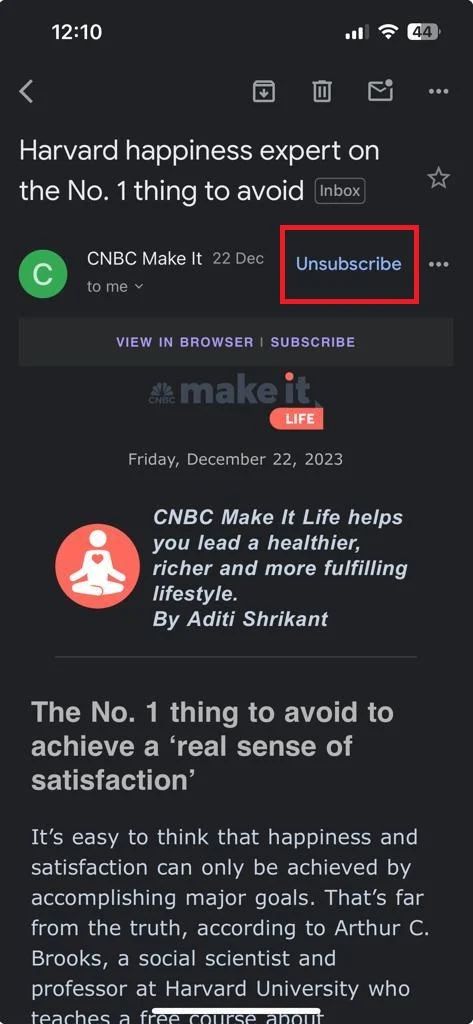
Upon tapping the 'unsubscribe' button, users are prompted with a pop-up seeking confirmation. Once confirmed, Gmail sends an email from the user's account to the sender's ID, streamlining the entire unsubscription process. This user-friendly approach eliminates the need for scrolling and provides a quicker alternative to the previous methods.
While currently exclusive to iOS users, the exact timeline for the feature's availability on Android remains unclear. However, the introduction of the unsubscribe button on the web version, positioned conveniently next to the sender's name, indicates a broader implementation. Some emails may still direct users to the sender's website for the unsubscribe process, ensuring a seamless and efficient user experience across platforms. Stay tuned for further updates on the expansion of this time-saving feature to Android devices.